When available on 161SQN missions, there is an F10 Support Menu that is available to manipulate and control various airbourne support resources such as Tankers, AWACS and Drones.
To access this menu open the comms menu then choose the following options
- F10. Other
- F4. Support
you will be presented with the following menu
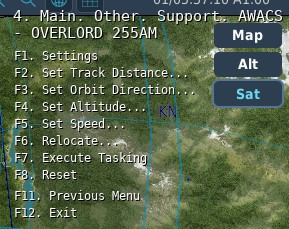
Settings: Displays configured parameters for the aircraft
Set Track Distance: Sets distance for a race track or to orbit at the current location
Set Orbit Direction: Sets the race track direction from the aircrafts current position
Set Altitude: Sets Altitude for race track/orbit
Set Speed: Sets speed for the race track/orbit
Relocate: See below
Execute Tasking: Execute the tasking as configured
Reset: Removes and resets the aircrafts current tasking
¶ Relocate
The relocate menu allows you to place a marker on the F10 Map and use this marker as the anchor point for the Support Tasking.
When selecting the Relocate from the support menu, a list of recognised waypoint markers will be displayed for you to choose from.
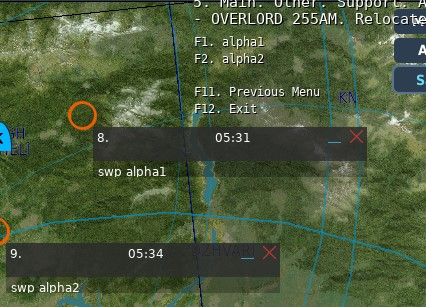
The markers must be prefixed swp (for Support Waypoint)
Select the destination waypoint and then select "Execute Tasking" to command the the unit to carry out the move.
The existing settings for speed, alts and race track directions are still applied.